Desk365 Support System & Microsoft Teams Bot Integration
Project Overview
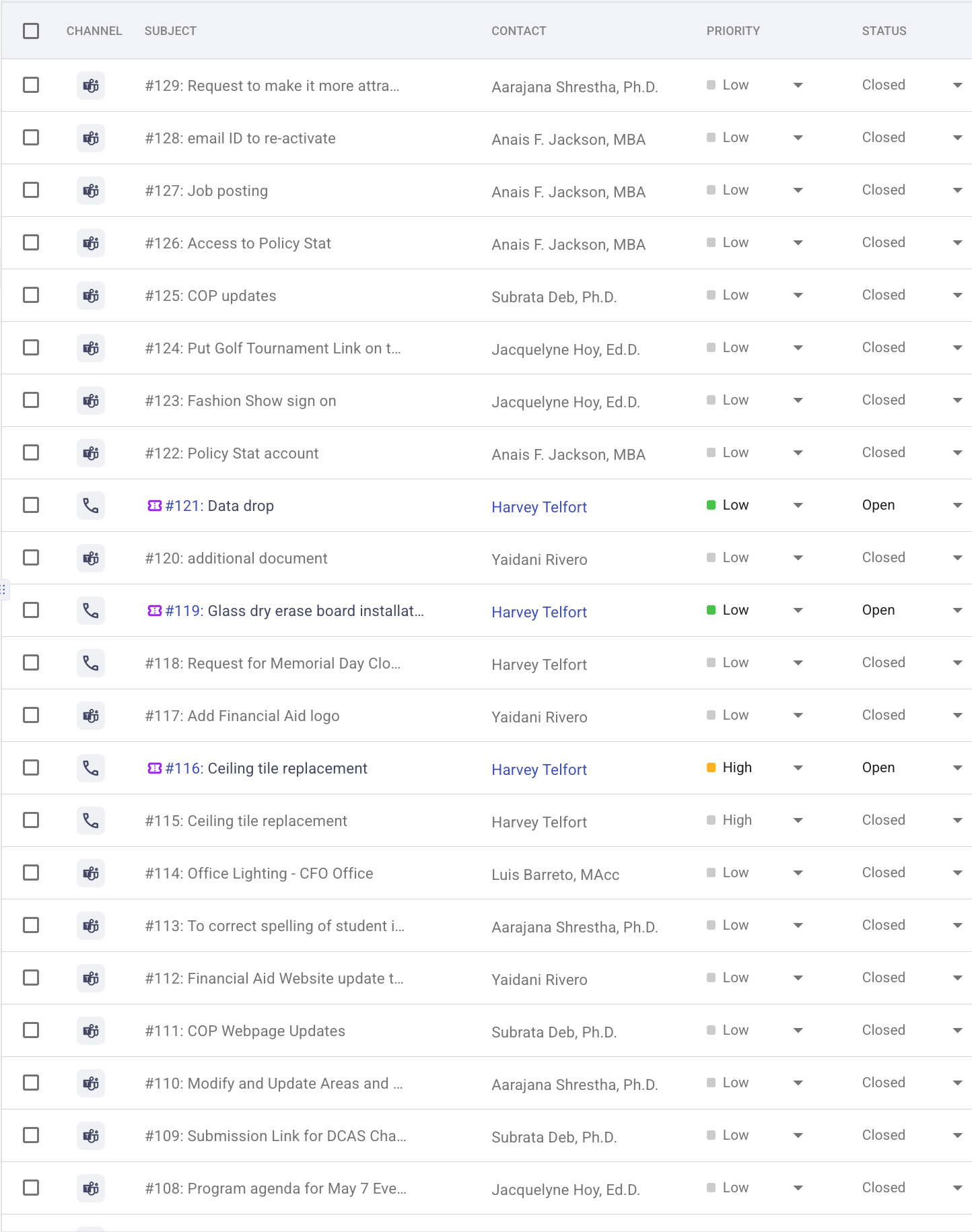
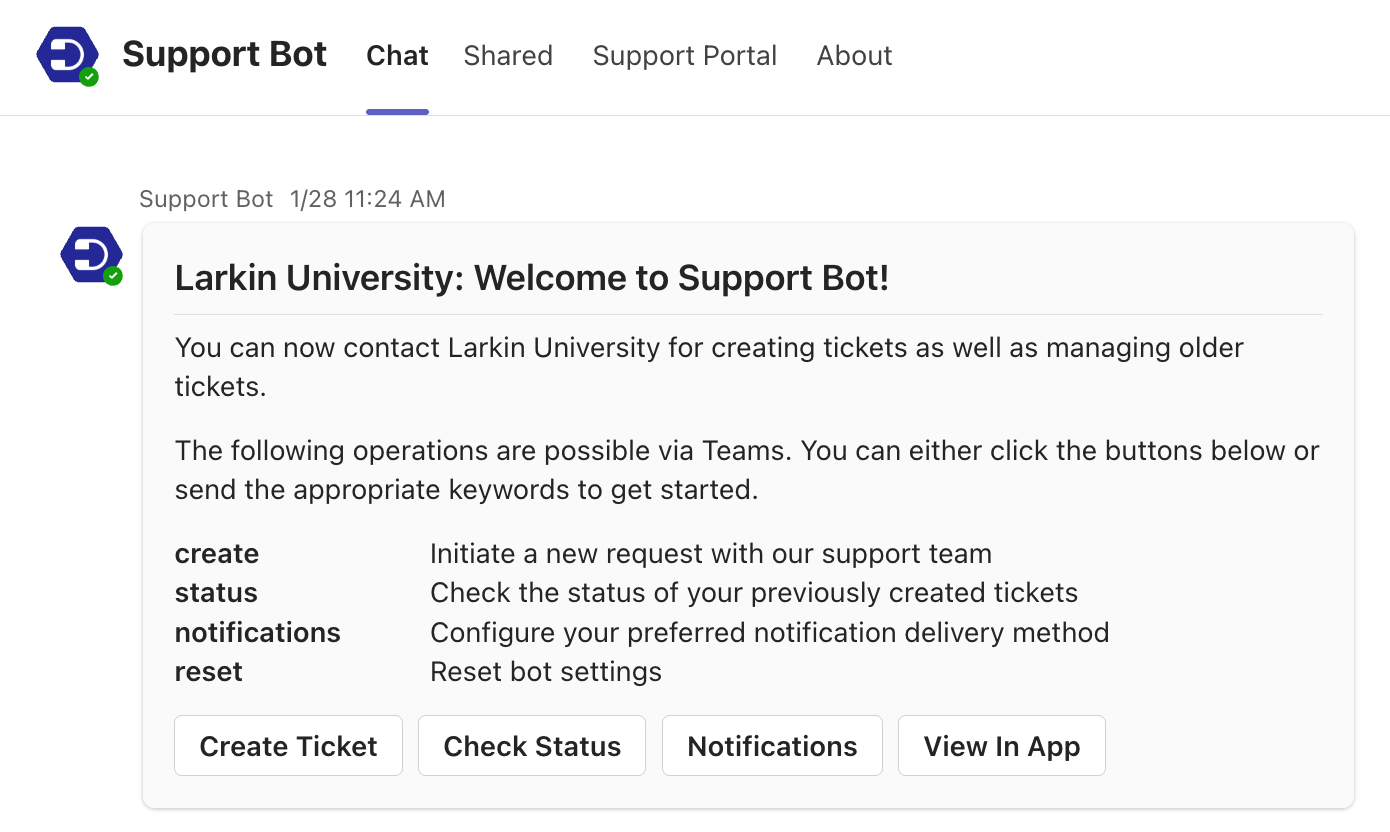
I led the implementation of a campus-wide support ticketing system using Desk365, integrated directly into Microsoft Teams. This digital solution streamlined the way departments at Larkin University submit, manage, and resolve operational requests. I configured the Desk365 Support Bot to allow users to submit tickets via Teams chat, eliminating the need for email chains and increasing workflow transparency.
Key Features & System Structure
1. Ticket Categories & Roles
Created department-specific ticket categories: IT Support, Facilities Request, Operations Request, and Digital Operations.
Assigned roles for Admins, Managers, Agents, and Watchers to ensure accurate routing and visibility of requests.
2. Bot Integration with Microsoft Teams
Successfully sideloaded and configured the Desk365 Support Bot within Teams.
Enabled real-time ticket submissions directly from chat, improving accessibility and user adoption.
3. Role-Based Access & Notifications
Customized access levels to protect sensitive information and prevent cross-departmental overload.
Set up automated notifications for ticket updates, escalations, and time tracking logs.
4. Time Tracking & Ticket Management
Implemented Desk365’s built-in time tracking to monitor the time spent on each ticket.
Used admin tools to close, reassign, and escalate tickets based on internal SLAs.
Technologies & Tools Used
Desk365 – Core ticketing platform
Microsoft Teams – Communication and bot integration
Microsoft 365 Admin Center – Role assignments and bot configuration
Power Platform – Supplemental documentation and workflow support
Impact & Results
Reduced email clutter and manual tracking by centralizing all requests.
Improved cross-department communication and accountability.
Increased resolution speed with real-time alerts and role-specific dashboards.
Empowered team members to self-manage requests and track progress easily.
This project reflects my ability to lead digital transformations, automate administrative workflows, and implement user-friendly tools that improve organizational efficiency.
________________________________________________________________________________
Smart Announcements System
Microsoft Teams Pop-Up Notification Workflow
Project Overview
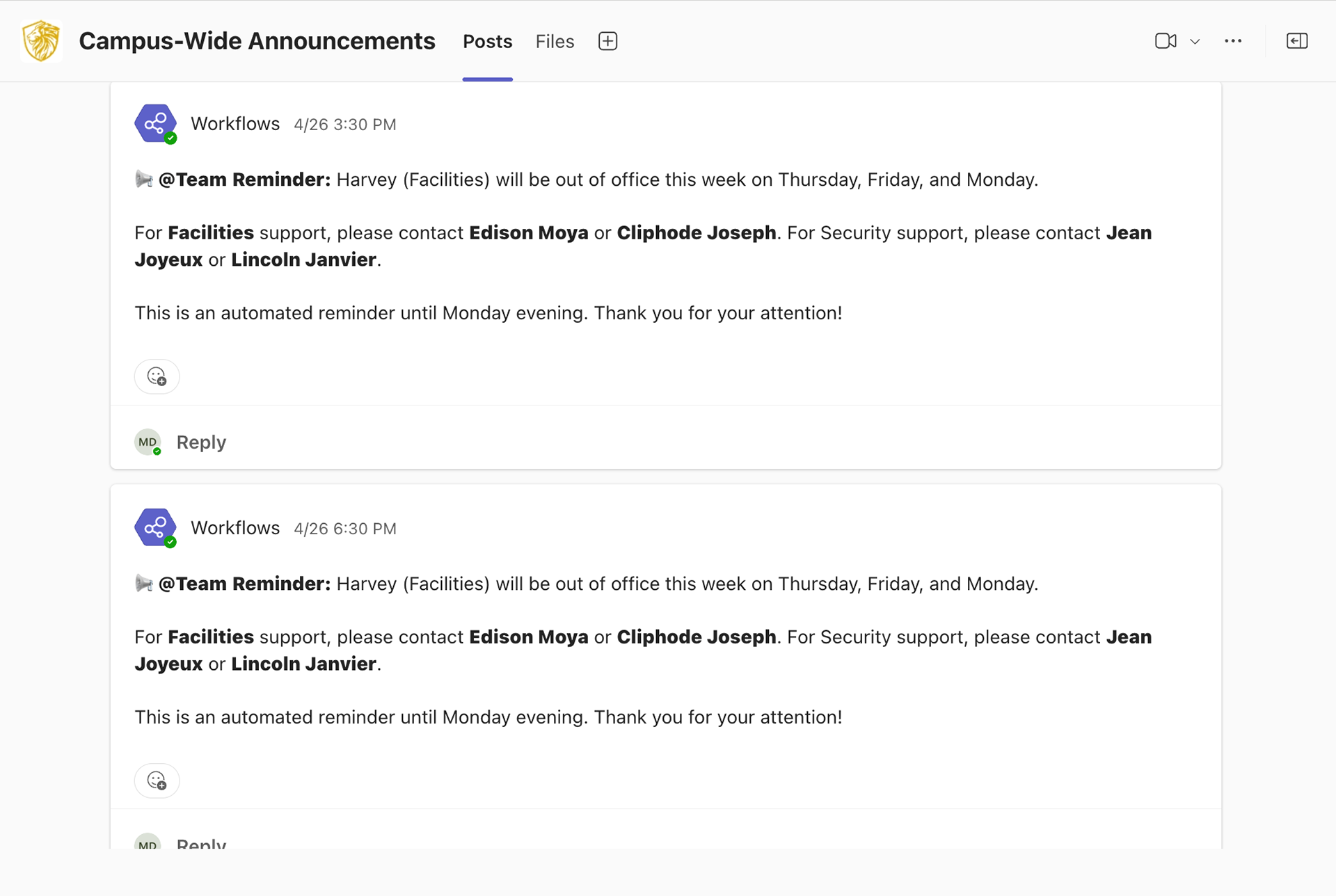
To streamline internal communication across departments, I built an automated announcement system that pushes scheduled pop-up messages directly into Microsoft Teams. Designed using Microsoft Power Automate and integrated with our existing infrastructure, this workflow enables university leadership to broadcast critical updates - like office closures, staff absences, deadlines, and campus events - without relying on email.
This solution empowers departments to maintain consistent messaging, improves staff awareness, and reduces confusion - especially during unplanned changes or event days.
How It Works
• Built in Microsoft Power Automate with Microsoft Teams integration
• Notifications are delivered as unobtrusive pop-up messages directly to faculty and staff
• Messages can be toggled on/off, scheduled for repeat delivery, or customized by urgency
• No third-party apps or licenses required - completely native to our Microsoft 365 environment
• Notifications are delivered as unobtrusive pop-up messages directly to faculty and staff
• Messages can be toggled on/off, scheduled for repeat delivery, or customized by urgency
• No third-party apps or licenses required - completely native to our Microsoft 365 environment
Technologies & Tools Used
Power Automate – Built automated flows for recurring and triggered announcements
Microsoft Teams – Used as the front-end delivery system for pop-up notifications
Microsoft 365 – Integrated with university infrastructure for seamless deployment
Microsoft Teams – Used as the front-end delivery system for pop-up notifications
Microsoft 365 – Integrated with university infrastructure for seamless deployment
Impact & Results
• Improved real-time communication across departments
• Enabled leadership to quickly share time-sensitive updates without email overload
• Reduced confusion around staff absences, campus closures, and schedule changes
• Created a cost-effective, scalable messaging solution without new software or training
This system helps the university stay informed and aligned - one smart message at a time.
________________________________________________________________________________
Digital Forms & Workflow Automation
Modernizing Campus Processes Across Departments
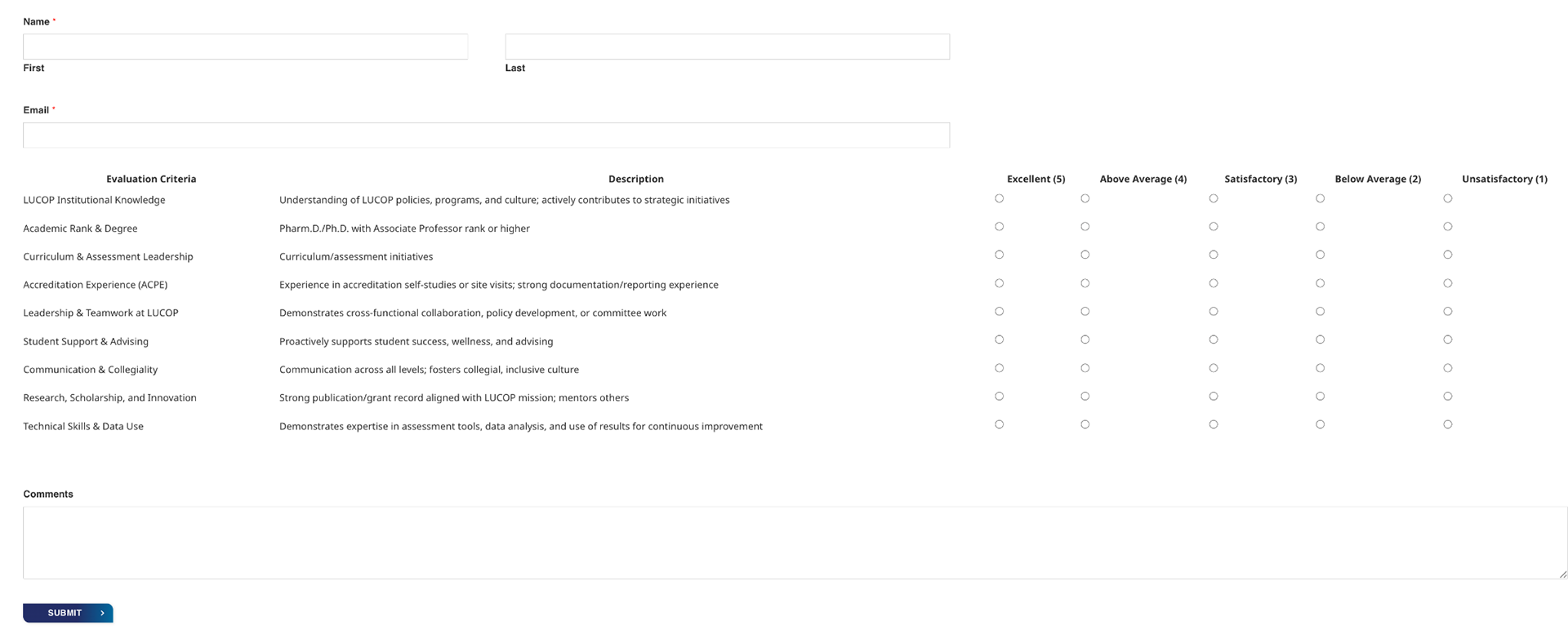
Employee Evaluation Form Coded with HTML & CSS
Project Overview
To eliminate outdated paper-based systems and improve efficiency across campus, I designed and launched a comprehensive suite of digital forms tailored to the unique needs of various departments. These custom-built forms replaced manual processes with streamlined digital submissions - enhancing accuracy, reducing delays, and making internal operations more scalable.
From business card requests to job applications, each form was built with mobile compatibility, a clean UI, and department-specific approval workflows.
Forms & Use Cases
• Business Card Request Form
• Event Flyer Request Form
• Parking Decal Submission Form
• Job & Program Application Forms
• Employee Performance Evaluation Forms
• Event Sign-Up & RSVP Forms
• Event Flyer Request Form
• Parking Decal Submission Form
• Job & Program Application Forms
• Employee Performance Evaluation Forms
• Event Sign-Up & RSVP Forms
Technologies & Tools Used
Wordpress / WPForms – Built custom forms and logic-based routing
Impact & Results
• Replaced slow, error-prone paper processes with fully digital systems
• Reduced turnaround time for requests and approvals
• Customized workflows to match department-specific needs
• Improved accessibility with mobile-friendly design
• Forms are actively in use across campus and continue to improve efficiency
• Reduced turnaround time for requests and approvals
• Customized workflows to match department-specific needs
• Improved accessibility with mobile-friendly design
• Forms are actively in use across campus and continue to improve efficiency
These digital forms transformed everyday campus operations into seamless, modern experiences for staff, students, and leadership alike.
________________________________________________________________________________
AI Training Video & HR Onboarding Workflow
Project Overview
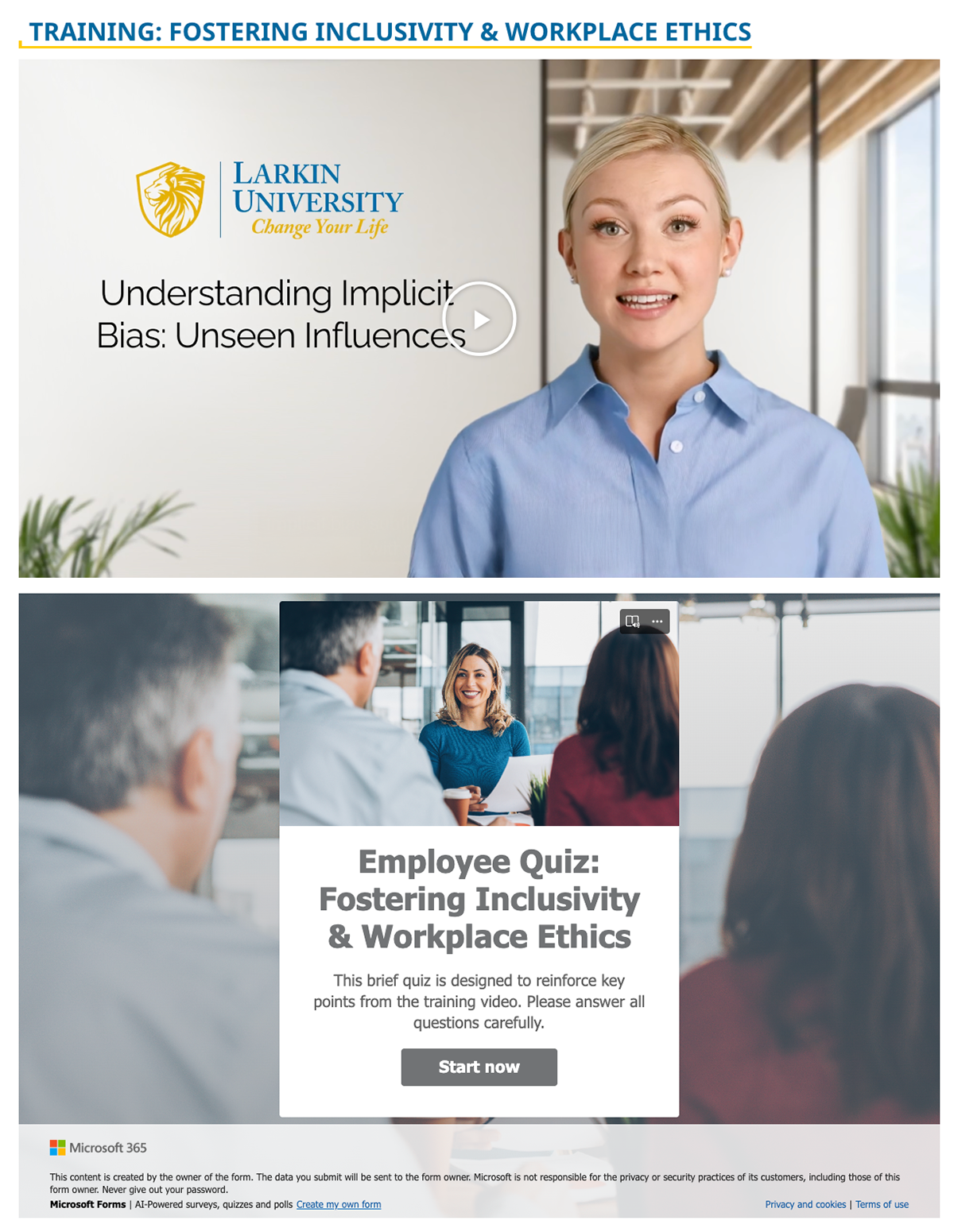
To support Human Resources in streamlining employee onboarding and promoting a more inclusive workplace culture, I produced a professional training video on Fostering Inclusivity and Workplace Ethics using AI-generated narration. The video was paired with a custom-built quiz and an electronic onboarding checklist - laying the groundwork for a centralized, tech-enabled training experience within the university’s Lion Portal.
This initiative marked the first step toward digitizing HR’s manual onboarding process and delivering consistent, policy-aligned training to all new hires.
Key Features
• AI-Narrated Training Video on Inclusivity & Workplace Ethics
• Interactive Microsoft Quiz to assess engagement and comprehension
• HR policy alignment through collaboration with leadership
• Launch of a scalable digital onboarding checklist inside Lion Portal
• Designed to reduce paper usage and manual tracking
Technologies & Tools Used
AI Video Generator – Produced voice-narrated training content
Microsoft Forms – Developed the post-video assessment quiz
Lion Portal (SharePoint) – Structured onboarding checklist and resources
Adobe Photoshop – Designed training visuals and graphics
Impact & Results
• Improved consistency in employee training content
• Replaced outdated, manual HR workflows with a modern, digital solution
• Increased engagement with interactive and accessible materials
• Set the foundation for a fully automated onboarding experience across departments
This project helped modernize the university’s HR training approach while reinforcing its commitment to inclusive and ethical workplace practices.